Press HOME, go to Apps and search for IBO Player Pro. Then pick what you see below.
Not found at first? Update the TV via Settings, Support, Software Update and search again. Newer apps sometimes only appear after an update.
Samsung has never used Android TV on its TVs, so Fastmate V2 cannot be installed on a Samsung. IBO Player Pro is the app we support on Samsung.
| Situation | Recommended | How you install it | Support |
|---|---|---|---|
| App found in Apps | IBO Player Pro | Samsung app store, activation by our team | Full |
| App not found or older model | Fast-Forward box | Connect one of our boxes via HDMI | Via box |
You install the app yourself from the Samsung app store. We then activate it and link your subscription for you.
- Press HOME on your Samsung remote and go to Apps.
- Choose the magnifying glass at the top, type IBO Player Pro and select the app.Several apps with similar names exist. The right app refers to the website iboproapp.com, for example on its start screen. Not sure? Send us a photo of the screen first.
- Choose Install and then Open.
- The start screen shows a MAC address and a Device Key. Take a photo of it or write both down.
- Order your licence via the IBO Player Pro page if you do not have one yet.Not sure yet? The app can be used free for 6 days, so you can test it first.
- Send the MAC address and Device Key to your Fast-Forward team member on WhatsApp or Discord. We activate the app and link your subscription.
- Restart the app. Your channels, films and series now appear.Easiest way: hold the power button on the remote until the Samsung logo appears, then open the app again.
On older Samsung models IBO Player Pro may not be available, and those are not supported. The easy fix: connect one of our boxes to your Samsung via HDMI. Your TV simply becomes the screen, and you get the full experience on the box, including Fastmate V2 on our Android boxes.
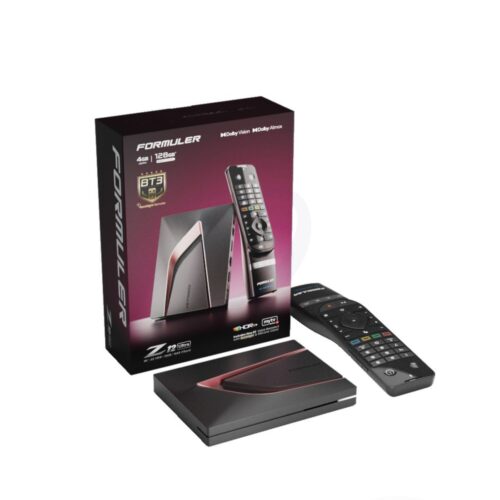 FORMULER
Latest flagship model. Android 12, 4GB RAM, 128GB storage. Compatible with MTO3, Fastmate V2 and all major streaming apps.
 XSARIUS
Fastest zapping model from Xsarius. Bluetooth remote with backlight and silicon case included.
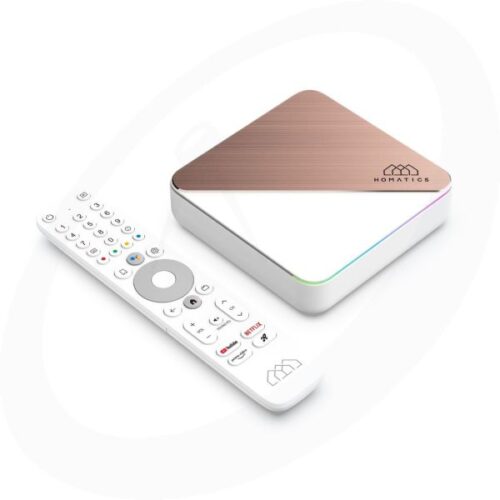 HOMATICS
4K with Dolby Vision & Atmos. Netflix, Disney+ and Prime Video certified. Wi-Fi 6, 4GB RAM, 32GB storage.
- Connect the box to a free HDMI port on your Samsung and plug in the power adapter.
- Connect a network cable for the most stable picture, or use Wi-Fi during the box setup.
- Press HOME on your Samsung remote, go to Sources and choose the HDMI input the box is connected to.
- Our boxes come pre-configured. Open the app, and if asked, enter the subscription details you received from Fast-Forward.
Change one thing at a time and test after each change. That way you know what fixed it.
| What you see | Likely cause | What to do |
|---|---|---|
| IBO Player Pro is not in Apps | Outdated software or an older model | Update via Settings, Support, Software Update. Still missing? Use Route B |
| IBO Player Pro shows no channels | Subscription not linked yet | Send MAC and Device Key, then restart the app |
| Activation does not work with our details | A look-alike app with a similar name is installed | Check that the app refers to iboproapp.com, or send us a photo of the app |
| Guide shows the wrong times | Wrong clock or time zone on the TV | Set the clock to automatic via Settings, General, System Manager, Time |
| Picture stutters or buffers | Weak Wi-Fi or slow connection | Use a network cable or 5 GHz Wi-Fi, restart the router |
| TV freezes or the app reacts slowly | Memory full or system hang | Hold the power button until the Samsung logo appears, then try again |
Short answers to what Samsung owners ask us most.
Can I use Fastmate V2 on my Samsung?
Which Samsung TVs work with IBO Player Pro?
Do I pay for IBO Player Pro separately?
When is a separate box the better choice?
Can I test it before I buy?
Send us your model number or a photo of your screen via WhatsApp or Discord. Every day from 08:00 to 21:00, in Dutch and English.